
Why WiFi Channels Matter More Than Frequency Bands in Real-World Signal Interference ?
When people search for a WiFi jammer, they often focus on the numbers first:
- 2.4 GHz
- 5 GHz
- 6 GHz
- output power
- coverage range
These specifications look clear, but they do not always explain why two devices working in the same environment can produce different results.
The missing factor is often the WiFi channel.
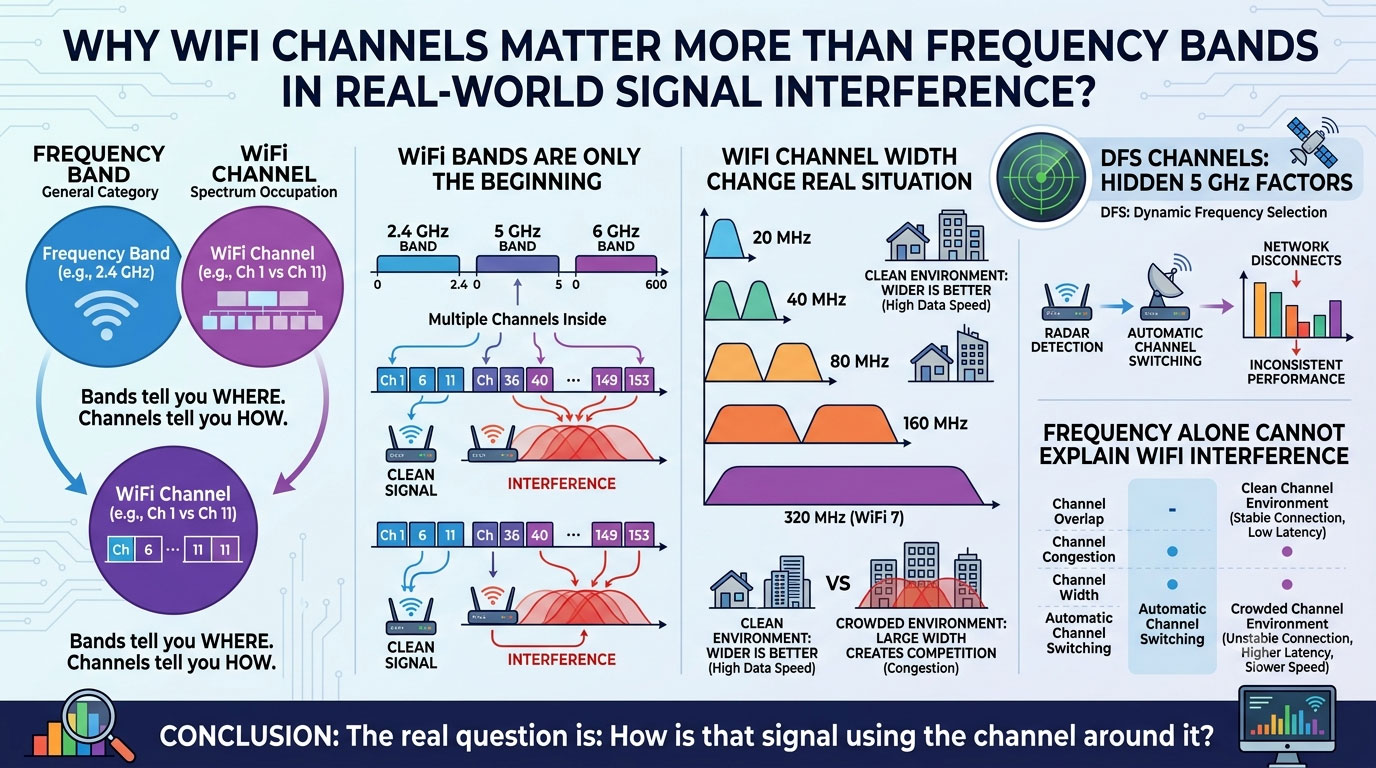
A frequency band tells you where a wireless signal operates.
A channel tells you how that signal actually occupies the spectrum.
This difference becomes increasingly important with modern WiFi networks.
2.4 GHz, 5 GHz and 6 GHz Are Only the Beginning
WiFi bands are only broad categories.
Inside each band, there are multiple channels.
For example, the 2.4 GHz band commonly uses:
- Channel 1
- Channel 6
- Channel 11
A router using Channel 1 and another router using Channel 11 are both operating at 2.4 GHz, but they may experience completely different interference conditions.
The same applies to 5 GHz networks.
A crowded channel can reduce performance even when the signal itself appears strong.
This is why looking only at frequency information often gives an incomplete picture of a wireless environment.
Why Channel Selection Changes Real WiFi Behavior ?
Wireless communication is not happening in an empty space.
In offices, apartments, warehouses, and public areas, many devices share the same radio environment:
- routers
- smartphones
- cameras
- IoT devices
- wireless sensors
When multiple networks compete on the same channel, problems may appear:
- unstable connections
- slower transmission
- higher latency
- unexpected signal changes
For users comparing WiFi jammer performance, this explains why results can vary between locations.
The surrounding channel environment can be just as important as the frequency itself.
Channel Width: Why 80 MHz, 160 MHz and 320 MHz Change the Situation
Another factor that is often overlooked is channel width.
A wider channel allows more data transmission, but it also occupies more spectrum.
Common WiFi channel widths include:
- 20 MHz
- 40 MHz
- 80 MHz
- 160 MHz
With WiFi 7320 MHz channel width introduces even higher performance possibilities.
However, wider is not always better.
In a clean environment, a 160 MHz or 320 MHz channel can provide excellent speed.
In a crowded environment, using a large channel width can create more competition for available spectrum.
The real question is not:
“Does the network support 160 MHz?”
It is:
“Can the environment actually support 160 MHz?”
DFS Channels: The Hidden Factor Behind 5 GHz Changes
Many users are familiar with 5 GHz WiFi but rarely pay attention to DFS channels.
DFS (Dynamic Frequency Selection) allows WiFi equipment to use certain 5 GHz channels while monitoring for priority signals such as radar systems.
If these signals are detected, the network may automatically move to another channel.
This can create situations where:
- the connection suddenly changes
- the network temporarily disconnects
- performance appears inconsistent
A wireless problem is not always caused by weak coverage.
Sometimes, it is related to channel management.
Why Frequency Alone Cannot Explain WiFi Interference?
A common mistake is to ask:
“Is this a 2.4 GHz or 5 GHz problem?”
A better question is:
“Which channel is being used, how wide is it, and how busy is that channel?”
Two networks can share the same frequency band but have very different conditions because of:
- channel overlap
- channel congestion
- channel width
- automatic channel switching
This is why modern wireless analysis focuses more on channel behavior.
New Search Trends Around WiFi Jammers and Wireless Interference
Users are no longer only searching for general terms like “full-band WiFi jammer.”
More specific questions are appearing:
- why WiFi jammer performance changes by location
- why 5 GHz WiFi is harder to control than expected
- why some WiFi signals remain stable during interference
- how WiFi channels affect signal blocking distance
- why the same WiFi jammer works differently on different routers
- WiFi 6E and WiFi 7 interference challenges
These searches show a shift:
People are not only interested in the device itself.
They want to understand why wireless signals behave differently in real environments.
Conclusion
Frequency bands provide a basic overview of WiFi.
But channels determine how wireless signals actually share the available spectrum.
With newer technologies such as WiFi 6E and WiFi 7, factors like:
- WiFi channels
- DFS channels
- 160 MHz
- 320 MHz channel width
For anyone studying WiFi interference, signal management, or wireless performance, the key is no longer only the frequency.
The real question is:
How is that signal using the channel around it?
